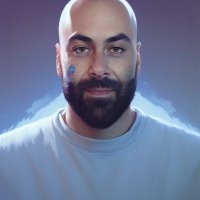
 Do you have trouble generating images where the protagonist appears consistently?
 That's over with Rendernet AI!
 If you want to know how, here's a quick and easy guide to do it.
Show me what you can do!
#AIArtCommunity #QuickGuide
If you want to know how, here's a quick and easy guide to do it.
Show me what you can do!
#AIArtCommunity #QuickGuide
Do you have trouble generating images where the protagonist appears consistently?
That's over with Rendernet AI!
If you want to know how, here's a quick and easy guide to do it.
Show me what you can do!
#AIArtCommunity #QuickGuide 
 First, we need a reference image. You can generate it with any application, in this case, I've used @rendernet to generate it (check the prompt in ALT). Try it at:
rendernet.ai
I've used the Absolute Reality model.
First, we need a reference image. You can generate it with any application, in this case, I've used @rendernet to generate it (check the prompt in ALT). Try it at:
rendernet.ai
I've used the Absolute Reality model. 
 Now let's use the FaceLock function by uploading the image generated earlier. This way, it will serve as a reference for our next creations. You can see it in this video
 Now let's choose a model, I've opted for the Absolute Reality model, but you can try any of them and share the results with me.
Write a prompt (you can reuse the previous one with some variations), and you'll see how all the creations maintain tremendous consistency!
Now let's choose a model, I've opted for the Absolute Reality model, but you can try any of them and share the results with me.
Write a prompt (you can reuse the previous one with some variations), and you'll see how all the creations maintain tremendous consistency!  And that's it! I leave you with 3 images and the prompts used in the ALTs.
Remember, you can join @rendernet for free at:
rendernet.ai
Oh! And if you liked it, leave a like, repost, or save the main post for later!
And that's it! I leave you with 3 images and the prompts used in the ALTs.
Remember, you can join @rendernet for free at:
rendernet.ai
Oh! And if you liked it, leave a like, repost, or save the main post for later! 


TechHalla
@techhalla
Consistently offering insights on generative AI prompts.
Follow to boost your skills.
United, we achieve more!
Join me on Remix! 👇
Missing some tweets in this thread? Or failed to load images or videos? You can try to .